ChatGPT 테마 · 크롬 확장ChatGPT Themes · Chrome Extension
ChatGPT 테마로
대화창을 내 취향대로
Custom ChatGPT Themes,
Backgrounds & Colors
클릭 한 번으로 ChatGPT 배경·색상·폰트를 바꾸고 글래스(유리) 효과까지. 내 이미지를 배경으로 올리거나 다른 사람이 만든 ChatGPT 테마를 그대로 적용하세요. 가벼운 무료 크롬 확장입니다. Change the ChatGPT background, colors and fonts in one click — and add a frosted glass effect. Upload your own wallpaper or apply community ChatGPT themes. A lightweight, free Chrome extension.
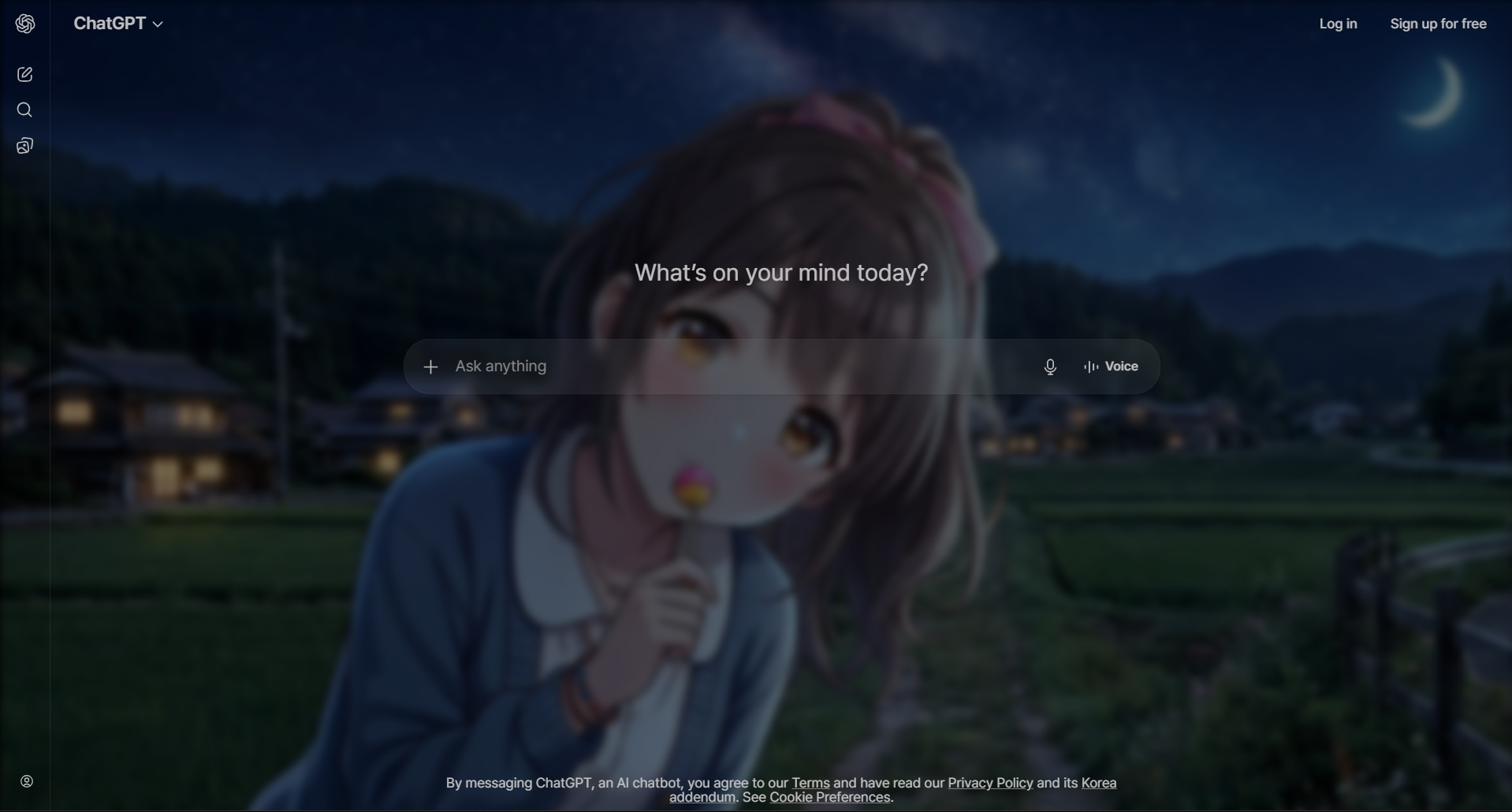
ChatGPT를 완전히 새로운 공간으로A whole new space for ChatGPT
기본 ChatGPT 화면이 지겨우셨나요? Chroma AI는 배경, 색상, 폰트, 유리 효과를 사이드바 하나에서 조절해 ChatGPT를 원하는 분위기로 바꿔줍니다. Tired of the default ChatGPT look? Chroma AI turns ChatGPT into any mood you want — background, colors, fonts and glassmorphism, all from a single sidebar.
12가지 무료 프리셋12 free color presets
배경·강조·텍스트 색이 한 번에 바뀌는 큐레이션된 ChatGPT 테마.Curated ChatGPT themes where background, accent and text colors swap together in one click.
내 배경 이미지 업로드Upload your own background
GIF·고해상도 지원. 좋아하는 사진이나 움직이는 배경을 ChatGPT 배경으로.GIF and high-resolution supported. Set any photo or animated wallpaper as your ChatGPT background.
글래스 · 블러 효과Glass & blur effects
유리질감 블러, 투명도, 색상 오버레이로 세련된 ChatGPT 화면 완성.Frosted glass blur, opacity control and color overlay for a polished ChatGPT interface.
색만 바꾸는 게 아닙니다More than a recolor
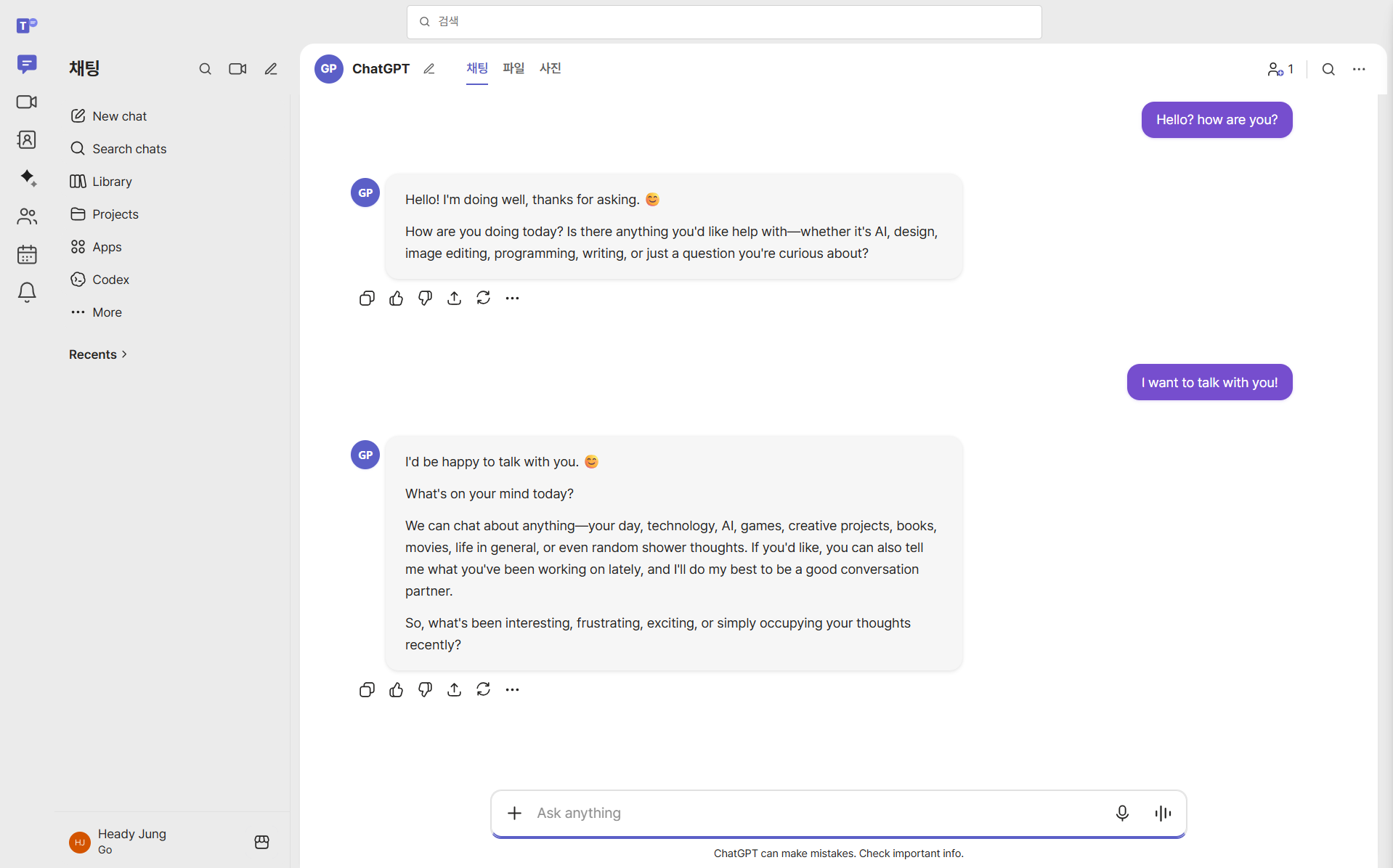
프리셋 테마로 통째로 변신Full preset makeovers
ChatGPT를 메신저나 스프레드시트처럼 재구성하는 커스텀 프리셋까지. 단순한 다크 테마를 넘어선 커스터마이즈.Custom presets re-skin ChatGPT as a messenger or a spreadsheet — far beyond a simple dark theme.
- 저장 가능한 테마 프리셋 (Pro)Saved theme presets (Pro)
- 커스텀 폰트 (Pro)Custom fonts (Pro)
- ChatGPT·Claude·Gemini 동시 지원Works on ChatGPT, Claude & Gemini
3단계로 시작Get started in 3 steps
확장 설치Install the extension
Chrome 웹 스토어에서 Chroma AI를 무료로 추가하고 고정하세요.Add Chroma AI free from the Chrome Web Store and pin it.
ChatGPT 열기Open ChatGPT
평소처럼 chatgpt.com에 접속합니다.Visit chatgpt.com as you normally would.
테마 적용Apply a theme
아이콘을 클릭하면 사이드바가 열리고, 프리셋 선택 또는 이미지 업로드로 즉시 적용.Click the icon, the sidebar opens — pick a preset or upload an image to apply instantly.
어떤 ChatGPT 테마가 오래 쓰이나Which ChatGPT themes people actually keep
테마를 적용했다가 며칠 만에 되돌리는 가장 흔한 이유는 "예쁘지만 읽기 불편해서"입니다. 화면 전체를 채우는 배경은 스크린샷에서는 멋져 보여도, 그 위에서 긴 글을 읽으면 이야기가 달라집니다. 오래 쓰이는 테마에는 공통점이 있습니다. The most common reason people revert a theme within days isn't that it looked bad — it's that it made reading harder. A full-screen background that impresses in a screenshot behaves differently once there are eight hundred words of response on top of it. Themes that survive share a few traits.
- 가운데가 조용한 이미지. 대화 텍스트는 화면 중앙을 따라 흐릅니다. 이미지의 가장 복잡한 부분이 정중앙에 있으면 매 줄이 배경과 싸웁니다.A quiet centre. Chat text runs down the middle of the screen, so an image whose busiest area sits dead centre fights every line you read.
- 모드와 밝기가 맞는 조합. 다크 모드에는 어두운 이미지, 라이트 모드에는 밝은 이미지. 반대로 조합하면 불투명도를 크게 올려야 해서 결국 이미지가 사라집니다.Brightness matched to your mode. Dark image with dark mode, light with light. Mixing the two forces opacity so high that the image barely survives anyway.
- 과하지 않은 대비. 순백 텍스트와 순흑 배경은 가장 선명하지만 몇 시간 뒤에는 가장 피로합니다. 살짝 부드럽게 낮추면 눈에 띄게 편해집니다.Slightly softened contrast. Pure white on pure black is the sharpest possible pairing and the most tiring after an hour. Easing both ends is barely visible and noticeably kinder.
- 강조색은 하나만. 강한 색이 여러 개면 서로 주의를 빼앗습니다. 배경은 차분하게, 강조는 한 가지 색으로.One accent, not three. Multiple strong colours compete. Keep the background low-saturation and let a single accent carry the personality.
더 자세한 기준과 실제로 잘 맞는 이미지 유형은 배경 선택 가이드에 정리해 두었습니다. We've written this up in more depth — including which categories of image reliably work and which fail — in the background selection guide.
테마와 다크 모드는 어떻게 다른가How a theme differs from dark mode
ChatGPT에는 이미 다크 모드가 있습니다. 밤에 화면이 덜 밝았으면 하는 것뿐이라면 그 설정으로 충분하고, Chroma AI는 그것을 대체하지 않습니다 — 선택한 모드 위에 얹힙니다. ChatGPT already has a dark mode. If all you want is "less bright at night," that setting is the right answer, and Chroma AI doesn't replace it — it layers on top of whichever mode you've chosen.
테마가 필요한 경우는 기본 팔레트 자체가 문제일 때입니다. 회색 일변도가 지겹거나, 대비가 너무 세거나, ChatGPT·Claude·Gemini를 동시에 띄워두고 탭을 구분하기 어렵거나, 작업 종류에 따라 분위기를 바꾸고 싶을 때. 이런 건 토글 하나로는 해결되지 않고, 배경·텍스트·강조색을 각각 조절할 수 있어야 합니다. A custom theme matters when the default palette itself is the problem: grey fatigue, contrast that's too harsh or too weak, three near-identical tabs you keep confusing, or wanting a different atmosphere for different kinds of work. None of that is solvable with a single toggle — it needs independent control of background, text and accent.
확장을 끄면 ChatGPT는 원래 모습으로 즉시 돌아갑니다. 계정이나 대화에는 아무 영향이 없습니다. Turn the extension off and ChatGPT returns to its normal appearance immediately. Nothing about your account or conversations is modified.
ChatGPT 화면에서 테마가 걸리는 지점Where theming meets the ChatGPT interface
ChatGPT는 대화만 있는 화면이 아닙니다. 코드 블록, 캔버스, 커스텀 GPT 목록이 각각 다른 규칙으로 그려지기 때문에, 배경 하나를 바꿔도 영역마다 결과가 다르게 나옵니다. 미리 알아두면 되돌릴 일이 줄어듭니다. ChatGPT isn't a single flat surface. Code blocks, Canvas, and the custom-GPT list are each painted by different rules, so one background change lands differently in each area. Knowing this in advance saves you from applying a theme and reverting it an hour later.
- 코드 블록은 따로 논다. 코드 블록은 자체 구문 강조 색을 갖고 있어서 주변 테마를 따라오지 않습니다. 배경을 어둡게 했다면 코드 블록만 떠 보이는지 반드시 확인하세요 — 개발 용도로 쓴다면 가장 자주 보게 되는 영역입니다.Code blocks keep their own palette. Syntax highlighting doesn't follow the surrounding theme, so a dark background can leave code blocks floating as bright rectangles. If you use ChatGPT for code, check this first — it's the area you'll look at most.
- 캔버스는 문서 화면에 가깝다. 캔버스를 열면 대화보다 훨씬 긴 글을 한 번에 읽게 됩니다. 대화창에서 편했던 대비가 캔버스에서는 부족할 수 있어요.Canvas reads like a document, not a chat. It puts far more text on screen at once, and contrast that felt fine in the message column often falls short there.
- 왼쪽 사이드바는 밀도가 높다. 대화 목록과 커스텀 GPT가 촘촘히 쌓이는 영역이라, 배경 이미지를 여기까지 깔면 항목 구분이 가장 먼저 무너집니다.The left sidebar is the densest part of the app. Conversation history and custom GPTs stack tightly, so it's the first place an image background stops being readable.
- ChatGPT 자체 다크 모드와 겹칠 수 있다. 설정의 Theme이 Dark인 상태에서 밝은 테마를 얹으면 두 층이 싸웁니다. 한쪽 기준을 정하고 맞추는 편이 낫습니다.It layers on top of ChatGPT's own theme setting. Applying a light theme while the built-in Theme is set to Dark leaves two systems fighting. Pick one as your base and match the other to it.
자주 묻는 질문ChatGPT theme FAQ
Q. ChatGPT 배경을 어떻게 바꾸나요?Q. How do I change the ChatGPT background?
무료 Chroma AI 확장을 설치하고 ChatGPT를 연 뒤 Chroma AI 아이콘을 클릭, 프리셋을 고르거나 이미지를 업로드하면 배경이 즉시 바뀝니다.Install the free Chroma AI extension, open ChatGPT, click the Chroma AI icon, then pick a preset or upload an image — the background changes instantly.
Q. ChatGPT 테마는 무료인가요?Q. Are ChatGPT themes free?
네. 색상 프리셋·이미지 배경·글래스 효과는 무료입니다. Pro는 프리셋 저장과 커스텀 폰트를 추가로 제공합니다.Yes. Color presets, image backgrounds and glass effects are free. Pro adds saved presets and custom fonts.
Q. 안전한가요? 대화를 읽나요?Q. Is it safe? Does it read my conversations?
아니요. Chroma AI는 화면 외관만 클라이언트에서 바꿉니다. 대화를 수집·전송하지 않으며 설정은 브라우저에 로컬 저장됩니다.No. Chroma AI only changes the visual appearance on the client side. It never collects or transmits conversations, and settings are stored locally in your browser.
지금 ChatGPT를 꾸며보세요Theme your ChatGPT today
무료로 설치하고 1분 안에 첫 테마를 적용해보세요.Install free and apply your first theme in under a minute.
Chrome에 무료 추가Add to Chrome — Free