Gemini 테마 · 크롬 확장Gemini Themes · Chrome Extension
Google Gemini를
내 취향의 테마로
Custom Gemini Themes,
Backgrounds & Colors
클릭 한 번으로 Google Gemini의 배경·색상·폰트를 바꾸고 글래스 효과까지. 내 이미지를 배경으로 올리거나 커뮤니티가 만든 Gemini 테마를 그대로 적용하세요. 가벼운 무료 크롬 확장입니다. Change the Google Gemini background, colors and fonts in one click — and add a frosted glass effect. Upload your own wallpaper or apply community Gemini themes. A lightweight, free Chrome extension.
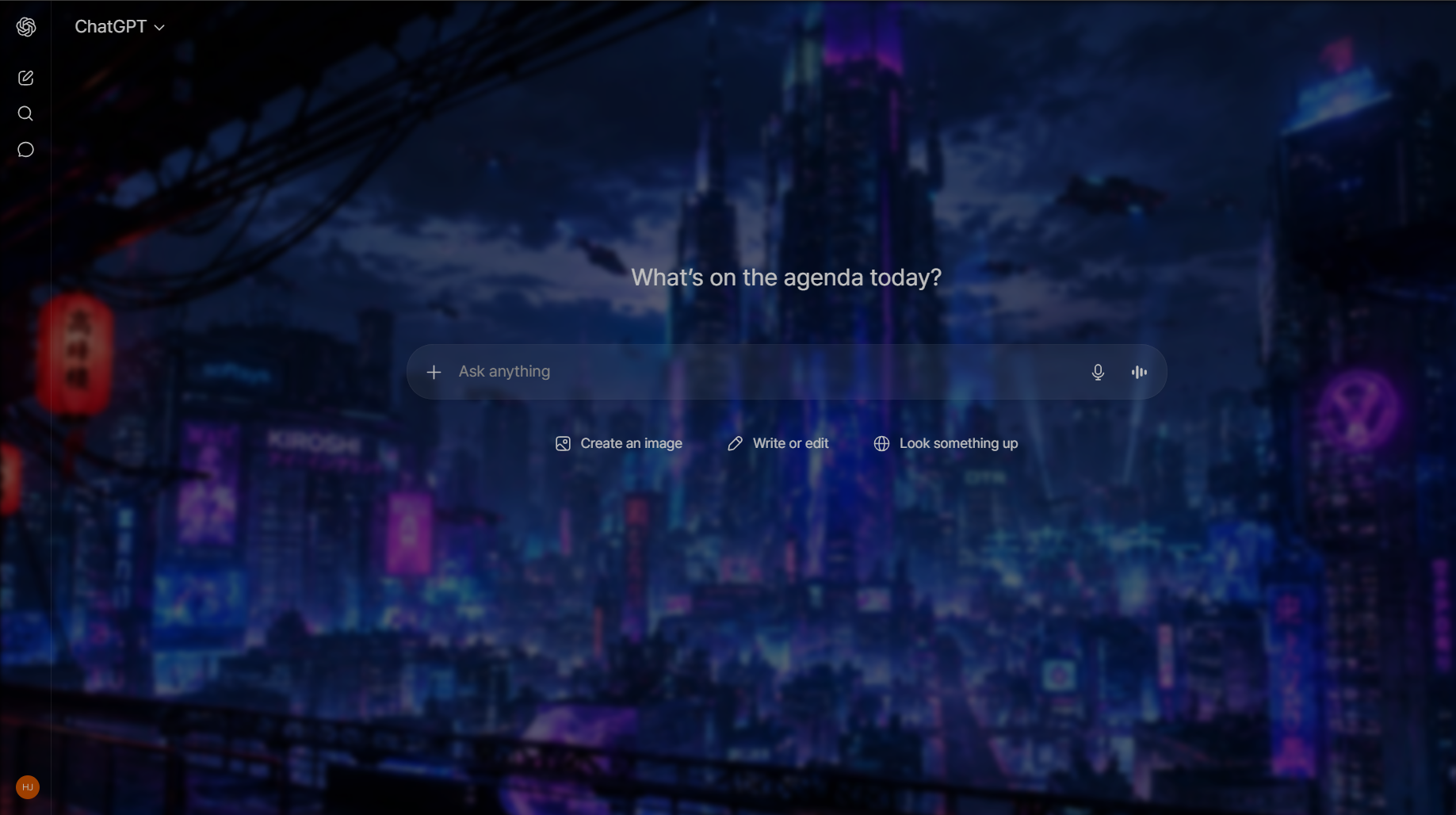
Gemini를 완전히 새로운 공간으로A whole new space for Gemini
기본 Gemini 화면이 밋밋하게 느껴지셨나요? Chroma AI는 배경, 색상, 폰트, 유리 효과를 사이드바 하나에서 조절해 Gemini를 원하는 분위기로 바꿔줍니다. Find the default Gemini interface a little plain? Chroma AI turns Gemini into any mood you want — background, colors, fonts and glassmorphism, all from a single sidebar.
12가지 무료 프리셋12 free color presets
배경·강조·텍스트 색이 한 번에 바뀌는 큐레이션된 Gemini 테마.Curated Gemini themes where background, accent and text colors swap together in one click.
내 배경 이미지 업로드Upload your own background
GIF·고해상도 지원. 좋아하는 사진이나 움직이는 배경을 Gemini 배경으로.GIF and high-resolution supported. Set any photo or animated wallpaper as your Gemini background.
글래스 · 블러 효과Glass & blur effects
유리질감 블러, 투명도, 색상 오버레이로 세련된 Gemini 화면 완성.Frosted glass blur, opacity control and color overlay for a polished Gemini interface.
색만 바꾸는 게 아닙니다More than a recolor
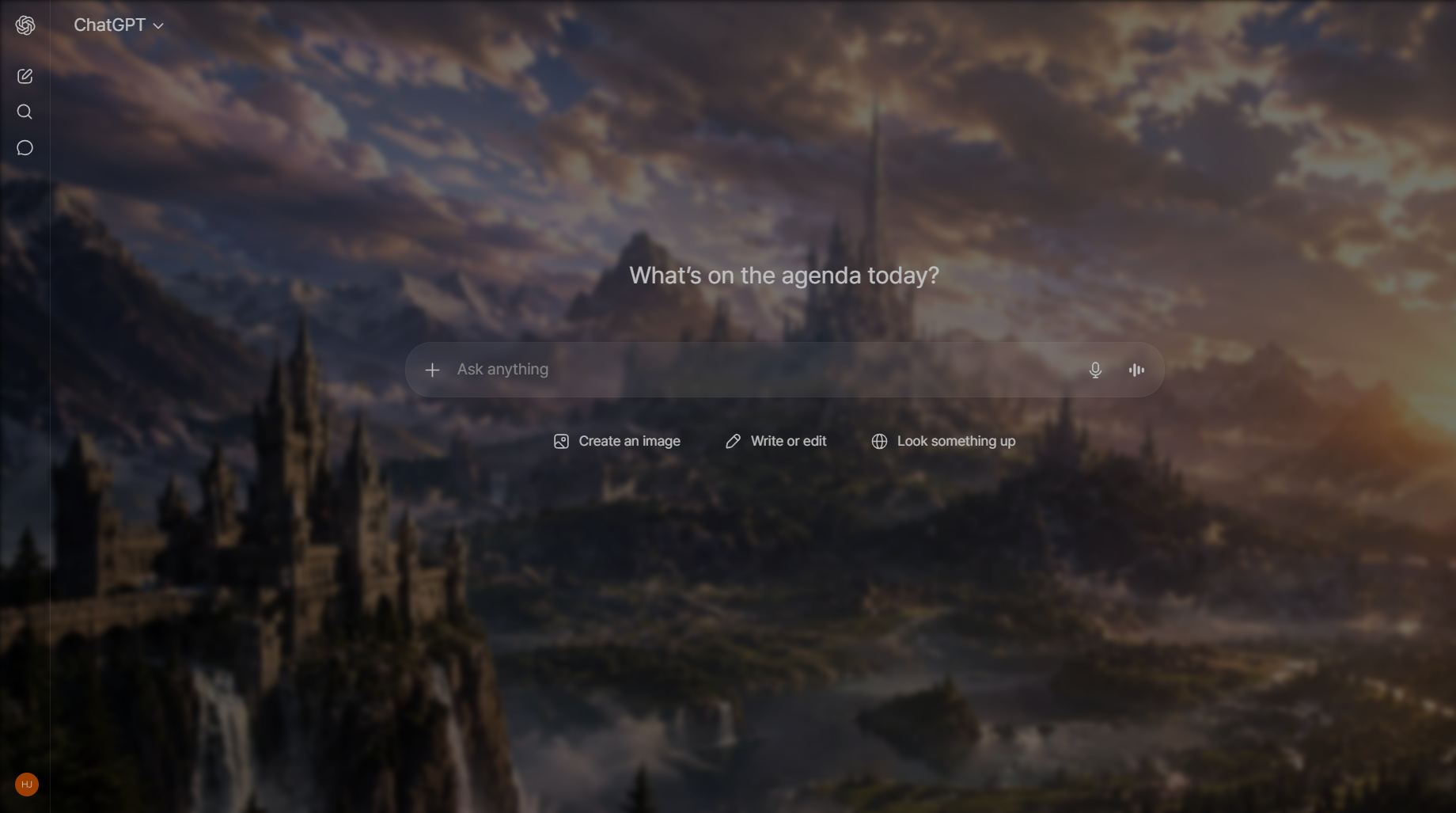
프리셋 테마로 통째로 변신Full preset makeovers
단순한 다크 테마를 넘어, Gemini의 분위기를 통째로 바꾸는 커스텀 프리셋. 저장하고 언제든 다시 불러오세요.Beyond a simple dark theme — custom presets transform the whole Gemini mood. Save them and reapply anytime.
- 저장 가능한 테마 프리셋 (Pro)Saved theme presets (Pro)
- 커스텀 폰트 (Pro)Custom fonts (Pro)
- ChatGPT·Claude·Gemini 동시 지원Works on ChatGPT, Claude & Gemini
3단계로 시작Get started in 3 steps
확장 설치Install the extension
Chrome 웹 스토어에서 Chroma AI를 무료로 추가하고 고정하세요.Add Chroma AI free from the Chrome Web Store and pin it.
Gemini 열기Open Gemini
평소처럼 gemini.google.com에 접속합니다.Visit gemini.google.com as you normally would.
테마 적용Apply a theme
아이콘을 클릭하면 사이드바가 열리고, 프리셋 선택 또는 이미지 업로드로 즉시 적용.Click the icon, the sidebar opens — pick a preset or upload an image to apply instantly.
Gemini는 무엇이 다른가What's different about theming Gemini
같은 배경 이미지라도 Gemini에서는 다르게 보입니다. 인터페이스 구조가 다르기 때문인데, 이걸 알고 고르면 시행착오가 확 줄어듭니다. The same image behaves differently in Gemini than in other AI chats, because the interface around it is laid out differently. Knowing how saves a lot of trial and error.
- 여백이 넓습니다. Gemini는 대화 주변에 공간을 많이 두기 때문에 배경이 실제로 더 많이 보입니다. 다른 곳에서 "너무 밋밋하다" 싶던 이미지가 여기서는 딱 맞고, 복잡한 이미지는 더 산만해집니다.It's airier. Gemini leaves more open space around the conversation, so more of your wallpaper is actually visible. Images you'd consider too subtle elsewhere often look right here — and busy ones become more distracting, not less.
- 라이트 테마가 정말 밝습니다. 라이트 모드에서 어두운 사진을 쓰면 오버레이를 크게 올려야 인터페이스 글자가 읽힙니다. 테마 밝기와 이미지 밝기를 맞추는 게 가장 빠른 길입니다.Its light theme is genuinely bright. Pairing it with a dark photo forces a much stronger overlay to keep interface text legible. Matching image brightness to your theme takes far less tuning.
- 고유 강조색이 있습니다. Gemini는 자체 색상을 곳곳에 쓰기 때문에, 한 가지 강한 색으로 가득한 배경은 부딪히기 쉽습니다. 채도가 낮은 이미지가 잘 어울립니다.It has its own accent colours. A background dominated by one strong hue can clash with them, so muted or neutral images tend to sit more comfortably.
- 왼쪽 목록이 넓습니다. 채팅 목록이 측면을 차지하므로, 초점이 왼쪽에 있는 이미지는 일부가 가려집니다. 중앙이나 오른쪽 구도가 유리합니다.The left rail is wide. Images with a focal point on the far left get partly covered — centre or right-weighted compositions survive better.
여기서 설정한 내용은 ChatGPT·Claude와 완전히 분리 저장되므로, Gemini만 전혀 다른 분위기로 꾸며도 다른 서비스에는 영향이 없습니다. Everything you set here is stored separately from your ChatGPT and Claude settings, so you can give Gemini a completely different personality without affecting the others.
단계별 설정 방법은 Gemini 배경 변경 가이드에서 확인하세요. For the step-by-step setup, see the Gemini background guide.
Gemini 화면에서 테마가 걸리는 지점Where theming meets the Gemini interface
Gemini는 구글 계정과 묶여 있고 구글 자체 디자인 시스템 위에 올라가 있습니다. 그래서 테마를 얹었을 때 나타나는 문제도 조금 다릅니다. Gemini is tied to your Google account and built on Google's own design system, so the friction points here differ from the other two.
- 계정 설정과 브라우저 설정이 따로 논다. Gemini의 라이트/다크 설정은 구글 계정을 따라 기기 간에 이동하지만, 브라우저 확장으로 얹은 테마는 그 브라우저에만 남습니다. 두 기기에서 화면이 달라 보이는 건 대부분 이 차이 때문입니다.Account settings and browser settings live in different places. Gemini's own light/dark choice follows your Google account across devices; a theme applied by a browser extension stays on that one browser. That mismatch is the usual reason Gemini looks different on your laptop and your desktop.
- 구글 UI는 자체 색 체계를 갖고 있다. 버튼과 칩 같은 요소가 구글 디자인 시스템의 색을 따르기 때문에, 강조색을 크게 바꾸면 일부 요소만 예전 색으로 남아 어색해질 수 있습니다. 강조색은 원래 톤에서 크게 벗어나지 않게 잡는 편이 깔끔합니다.Google's components carry their own colour system. Buttons and chips follow Google's design tokens, so a dramatic accent change can leave a few elements still wearing the original colour. Accents that stay in the same family as the default hold together better.
- 응답에 이미지와 카드가 자주 섞인다. Gemini는 검색 결과 카드나 이미지 결과를 본문에 자주 끼워 넣습니다. 배경 위에 이런 카드가 겹치면 카드 자체의 흰 면 때문에 배경이 조각조각 잘려 보입니다.Responses often contain cards and images. Gemini regularly embeds result cards and image blocks inline, and their opaque surfaces chop a background image into disconnected fragments.
- Gems를 쓰면 진입 화면이 달라진다. 커스텀 Gem으로 들어가면 시작 화면 구성이 바뀌므로, 기본 대화 화면에서만 확인하지 말고 자주 쓰는 Gem에서도 한 번 보세요.Gems change the entry screen. Opening a custom Gem gives you a different starting layout, so check your theme there too rather than only on the default chat view.
자주 묻는 질문Gemini theme FAQ
Q. Gemini 배경을 어떻게 바꾸나요?Q. How do I change the Gemini background?
무료 Chroma AI 확장을 설치하고 gemini.google.com을 연 뒤 Chroma AI 아이콘을 클릭, 프리셋을 고르거나 이미지를 업로드하면 배경이 즉시 바뀝니다.Install the free Chroma AI extension, open gemini.google.com, click the Chroma AI icon, then pick a preset or upload an image — the background changes instantly.
Q. Gemini 테마는 무료인가요?Q. Are Gemini themes free?
네. 색상 프리셋·이미지 배경·글래스 효과는 무료입니다. Pro는 프리셋 저장과 커스텀 폰트를 추가로 제공합니다.Yes. Color presets, image backgrounds and glass effects are free. Pro adds saved presets and custom fonts.
Q. Gemini 다크모드에서도 되나요?Q. Does it work with Gemini's dark mode?
네. 라이트·다크 모드 모두에서 테마가 얹히고, 투명도와 색상 오버레이로 세밀하게 맞출 수 있습니다.Yes. Your theme layers over Gemini in both light and dark mode, and you can fine-tune opacity and color overlay to match.
지금 Gemini를 꾸며보세요Theme your Gemini today
무료로 설치하고 1분 안에 첫 테마를 적용해보세요.Install free and apply your first theme in under a minute.
Chrome에 무료 추가Add to Chrome — FreeGemini 테마 확장이 거의 없는 이유 Why there are almost no Gemini theme extensions
확장 생태계는 ChatGPT 에 몰려 있습니다. 가장 많이 쓰이는 커스터마이즈 확장인 StylerGPT 와 GPThemes 는 둘 다 ChatGPT 전용이라 gemini.google.com 에서는 동작하지 않습니다. Gemini 는 애초에 배경 설정 기능 자체를 제공하지 않고요. The extension ecosystem clusters around ChatGPT. The most-used customization extensions, StylerGPT and GPThemes, are both ChatGPT-only and do nothing on gemini.google.com. Gemini itself offers no background setting at all.
Chroma AI 는 Gemini · ChatGPT · Claude 에서 함께 동작하며 사이트별로 테마를 따로 저장합니다. Gemini 의 밝은 인터페이스에 사진 배경을 얹을 때 글자가 묻히지 않도록, 블러 · 투명도 · 컬러 오버레이를 따로 조절할 수 있습니다. Chroma AI runs on Gemini, ChatGPT and Claude, and stores a separate theme per site. Because Gemini's interface is bright, blur, opacity and a color overlay are adjustable separately so text stays readable over a photo background.