How to Change Your ChatGPT Background & Wallpaper
Updated: July 28, 2026 · 2-minute read
ChatGPT ships with the same flat background for everyone. If you spend hours in it every day, a custom background or wallpaper makes the whole experience feel calmer and more personal. This guide shows you how to change your ChatGPT background to any image, GIF or color theme in about two minutes — no coding, no developer tools.
Step 1 — Install the Chroma AI extension
Chroma AI is a free Chrome extension that themes ChatGPT, Claude and Gemini. Open the Chrome Web Store page, click Add to Chrome, then pin the icon: click the puzzle-piece icon in the top-right of Chrome and pin Chroma AI so it's always one click away.
Step 2 — Open ChatGPT and launch the sidebar
Go to chatgpt.com as you normally would. Click the pinned Chroma AI icon and the editor sidebar slides in from the right. Everything happens inside your browser — Chroma AI never reads or sends your conversations, it only restyles the page.
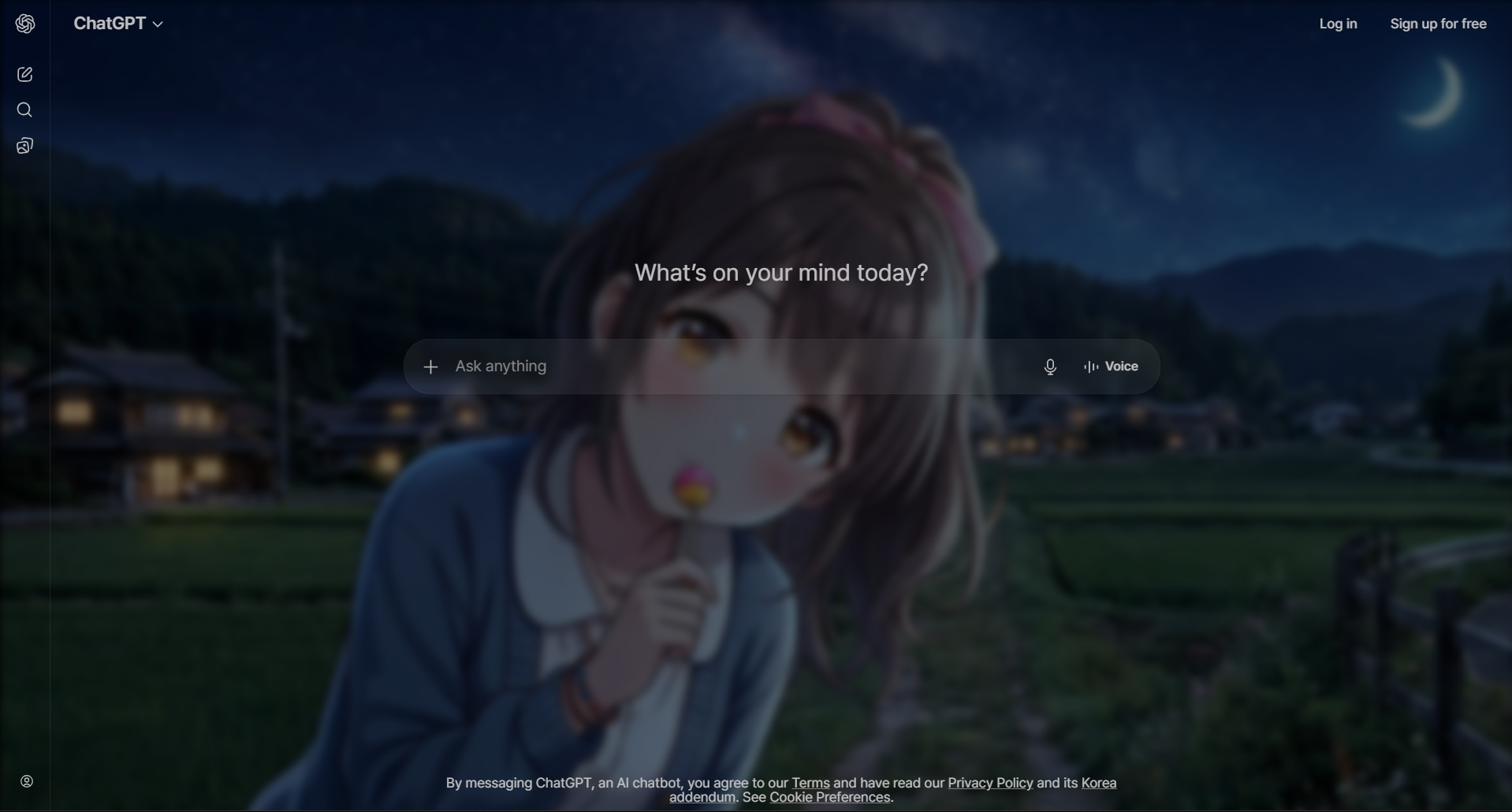
Step 3 — Set your background
In the sidebar you have two easy options:
- Upload your own image or GIF. Open the Media Background section and attach, drag & drop, or paste a photo, anime wallpaper, gradient or animated GIF from your computer. It becomes your ChatGPT background instantly.
- Pick a preset color theme. Prefer something clean? Choose one of the 12 free color presets (Midnight, Aurora, Sunset, Ocean, Neon, Forest and more) — background, accent and text colors all change together.
Free accounts include up to five custom image uploads; Pro unlocks unlimited uploads and saved presets.
Step 4 — Keep your text readable
A busy wallpaper can fight with the chat text — so Chroma AI puts an adjustable glass (glassmorphism) layer between them. Fine-tune three sliders until it looks right:
- Blur — softens the background so words stay crisp.
- Opacity — balances style vs. clarity.
- Color overlay — washes the wallpaper in a tint to unify the whole window.
You can also resize and reposition the image — drag, zoom and align it so it fits your screen exactly. If you resize the browser window, the background re-fits automatically.
How to choose a background that doesn't hurt readability
Most people's first attempt fails for the same reason: they pick a gorgeous, high-contrast photo, and then discover they can't read their own conversation. A wallpaper for a workspace is not the same as a wallpaper for a lock screen. Here's what actually works after living with one for a while.
- Prefer calm over busy. Landscapes, gradients, skies, fog, blurred bokeh and abstract textures sit quietly behind text. Detailed illustrations, dense cityscapes and images with lots of small high-contrast edges compete with every line you read.
- Watch where the detail sits. Chat text runs down the middle of the screen. An image whose busiest area is dead center will fight you; one with an open sky, empty water or negative space in the middle works far better.
- Match brightness to your mode. If you use ChatGPT in dark mode, a darker image needs less blur to stay readable. In light mode, a bright, low-contrast image is easier to work with. Mixing a very dark photo with light mode (or vice versa) forces you to crank opacity so high that you lose the image anyway.
- Beware of pure white or pure black regions. Large flat white areas can make light text vanish; large black areas do the same to dark text. Images with a mid-tone range are the most forgiving.
- Test with a real conversation. A background always looks fine on an empty screen. Open a long chat with code blocks and lists before you decide.
If you love a busy image and don't want to give it up, increase blur and add a subtle color overlay in your accent color. That keeps the mood of the picture while flattening the detail that interferes with text.
Recommended image sizes, formats and file sizes
You don't need to prepare anything special — Chroma AI will fit whatever you give it — but a little care produces a noticeably better result.
- Aspect ratio: 16:9 matches most laptop and desktop screens. A 16:9 image fills the window with the least cropping, so the part you liked in the thumbnail is the part you actually see.
- Resolution: 1920×1080 is the sweet spot for most people. 2560×1440 is worth it on a high-DPI or ultrawide display. Going far beyond your screen resolution mostly costs memory without looking better.
- Static formats: JPG for photographs (small files, no visible loss at wallpaper scale), PNG when you need crisp edges or flat color fields without compression artifacts. WebP works too and is usually the smallest.
- Animated formats: GIF is supported and gets a MOTION badge if you share it. Keep animated backgrounds subtle — slow drifting motion reads as ambience, fast motion pulls your eye away from what you're reading every few seconds.
- File size: under about 5 MB keeps everything snappy. Very large animated GIFs are the main cause of sluggish scrolling, because the browser has to keep decoding frames while you work.
Keeping it smooth
A background image is drawn behind everything else on the page, and the glass layer blurs whatever is underneath it. On a heavy page — a long conversation, a streaming response, fast scrolling — that combination is where slowdowns come from. Chroma AI handles most of this for you: it temporarily relaxes the blur while you scroll or while a response is streaming in, then restores it when things settle, and it skips re-blurring over animated backgrounds where the cost is highest.
If your setup still feels heavy, the usual culprits in order are: a very large animated GIF, a maximum-strength blur setting, and an image far larger than your screen. Reducing any one of those normally fixes it.
Troubleshooting
The background didn't appear after I picked it.
Refresh the ChatGPT tab (Windows Ctrl + R / macOS ⌘ + R). Themes apply immediately in most cases, but a tab that was already open before you installed the extension needs one reload.
The text is hard to read over my image.
Raise blur first, then opacity. If it's still fighting you, add a color overlay — a light wash unifies the whole window and separates the text from the picture without hiding the image.
The image looks cropped or off-center.
Use the position and zoom controls to drag and scale it. If the crop is severe, the source image's aspect ratio is far from your window's — a 16:9 version of the same picture will fit much better.
Scrolling feels slow with my background.
Try a static image instead of an animated GIF, lower the blur strength, or use an image closer to your screen resolution. Animated backgrounds at maximum blur are the most demanding combination.
My background disappeared after resizing the window.
It shouldn't — the background re-fits automatically when the window size changes. If something looks off, reload the tab and it will re-apply at the new size.
Bonus: share or discover backgrounds
Once you've built a look you love, you can share it to the Theme Gallery so other people can apply it in one click — or browse backgrounds other users have already made. Animated ones are marked with a MOTION badge.
How to do this without any extension
ChatGPT has no built-in setting for a custom background image, so every method below is a workaround. They are worth knowing because each one has a different failure mode.
A user stylesheet (Stylus)
Stylus is an open-source style manager that injects your own CSS into a site. A minimal ChatGPT background rule looks like this:
body {
  background-image: url("https://example.com/your-image.jpg");
  background-size: cover;
  background-attachment: fixed;
}
This works, but it is fragile in a specific way: ChatGPT's layout containers have their own opaque background colours, so your image will usually sit behind a solid panel and stay invisible until you also make those containers translucent. Because the class names are generated by a build tool, they change without notice, and your rule silently stops working after an OpenAI deploy.
DevTools (temporary)
Pressing F12 and editing styles in the Elements panel is the fastest way to test an idea, and the worst way to keep one — everything resets on reload. Use it to check whether an image reads well behind text before you commit to it.
What none of these give you
The hard part of a chat background is not applying the image. It is keeping body text legible on top of it, which needs a blur or scrim layer between the image and the text, plus per-element opacity control. That is the work a purpose-built theming tool does for you — and it is also the part you should evaluate before installing anything.
Frequently asked questions
Q. Can I use my own image as a ChatGPT background?
Yes — upload any photo, artwork or GIF from your computer. High-resolution and animated backgrounds are supported.
Q. Will a background make ChatGPT hard to read?
No. The frosted glass layer with adjustable blur and opacity keeps the chat text crisp over any wallpaper.
Q. Does it work on the ChatGPT desktop app?
Chroma AI works on chatgpt.com in the Chrome browser. It styles the web version, which is what most people use day to day.
Q. Is it safe? Does it read my chats?
It only changes the visual appearance on the client side. It never collects, intercepts or transmits your conversations, and theme settings are stored locally in your browser.
Change your ChatGPT background now
Free Chrome extension — set your first wallpaper in under two minutes.
Add to Chrome — Free